.jpg?max-width=780&max-height=260&quality=85)
Latest






PHOTOGRAPHY TECHNOLOGY
The automatic mode and pre-set modes for food, macro, night, portrait, panorama, and more are often sufficient. However, enabling the professional mode unlocks additional features. These settings require practice and experience, similar to traditional cameras. Here are the key concepts explained:
Aperture
The aperture (f-value) controls the amount of light reaching the sensor via an adjustable opening in the lens. A larger aperture (lower f-number, such as f/1.8) increases light intake and creates a shallower depth of field, isolating the subject from the background – ideal for portraits or close-up macro shots. Mobile devices simulate this software-driven "lens blur" in portrait modes, but physical limitations offer less dynamic results compared to large-aperture DSLR cameras.
ISO
The ISO value determines the sensor's light sensitivity. Higher values (e.g., 1600) increase brightness but can introduce noise. Mobile cameras use multiple exposures and AI-based noise reduction to handle high ISO levels, but manual adjustment below 400 is recommended in daylight. In low light, certain flagship devices can manage ISO 1600 with retained quality through computational photography.
Noise
Noise appears as graininess at high ISO or with long exposures. Modern mobile devices employ Night Mode to stack multiple images and reduce noise, though motion artifacts may occur. Manual ISO control and black-and-white filters can transform noise into aesthetic elements.
Shutter Speed
Shutter speed determines how long the sensor is exposed to light. Mobile devices typically manage 1/4 second handheld, but Pro modes enable longer exposures for effects such as waterfalls (1/2 second with a stable setup). Motion blur can also be simulated afterward with tools like Snapseed.
Raw Format
Raw format (DNG) saves unprocessed sensor data, offering greater editing flexibility in high-contrast scenes. This requires more storage space and specialized software like Lightroom to unlock its full potential.
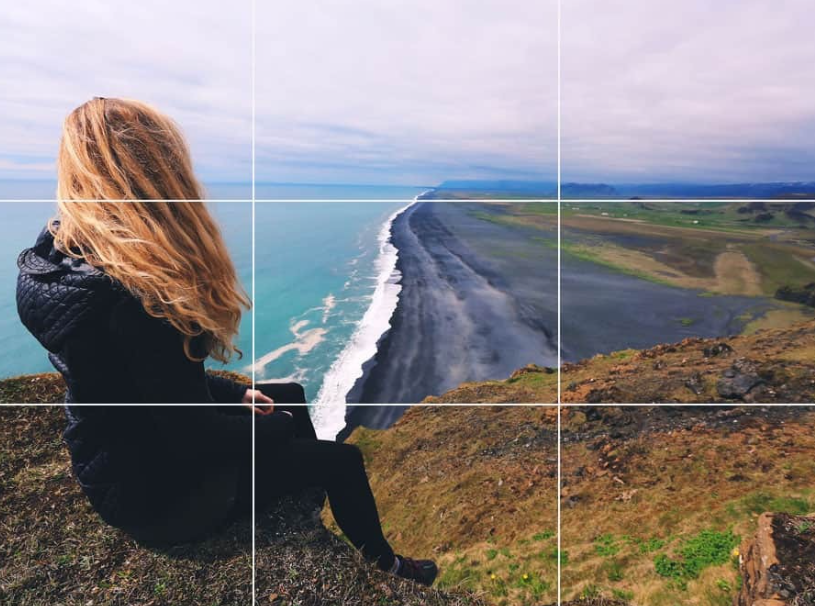
Rule of Thirds
The Rule of Thirds divides the image into nine zones using two horizontal and vertical lines. Place main elements at intersection points or along the lines for balance. Intentional rule-breaking, such as centering strong geometric shapes, can create a dramatic effect.
Editing apps
Enhance your photos with editing apps and create beautiful images. Read more about editing apps here.